- hpe.com 에서 서버 모델별 패키지 파일 다운로드
- snmp 서비스 설치 및 활성화
$> yum install net-snmp -y - 압축 해제
$> tar -zxvf hp-psp-8.60-8-CentOS.tar.gz $> cd psp/CentOS/5/i386/current - HP PSP 설치 및 구성하기
$> yum localinstall ./*.rpm $> /sbin/hpsnmpconfig This configuration script will configure SNMP to integrate with the HP SIM and the HP System Management Homepage by editting the snmpd.conf file. The HP-SNMP-Agents can also exist in a more secure SNMP environment (e.g. VACM) that you have previously configured. See the hp-snmp-agents(4) man page for specific details on how to configure the VACM entries in the ‘snmpd.conf’ file. You may press <ctrl+c> now to exit now if needed. Do you wish to use an existing snmpd.conf (y/n) (Blank is n): 엔터 You will now be asked a series of SNMP configuration questions. How you answer these question will affect the way SNMP behaves. Configuring SNMP could have security implications on your system. If you are not sure how to answer a question, you can abort by pressing and no changes will be made to your SNMP configuration. Enter the localhost SNMP Read/Write community string (one word, required, no default): public Re-enter the same input to confirm: public ACCEPTED: inputs match! Enter localhost SNMP Read Only community string (one word, Blank to skip): Enter Read/Write Authorized Management Station IP or DNS name (Blank to skip): 엔터 Enter Read Only Authorized Management Station IP or DNS name (Blank to skip): 엔터 Enter default SNMP trap community string (One word; Blank to skip): 엔터 Enter SNMP trap destination IP or DNS name (One word; Blank to skip): 엔터 The system contact is set to syscontact Root <root@localhost> (configure /etc/snmp/snmp.local.conf) Do you wish to change it (y/n) (Blank is n): 엔터 The system location is set to syslocation Unknown (edit /etc/snmp/snmpd.conf) Do you wish to change it (y/n) (Blank is n): 엔터 ============================================================================== NOTE: New snmpd.conf entries were added to the top of /etc/snmp/snmpd.conf ============================================================================== snmpd is started - HP PSP 서비스 실행
$> /etc/init.d/snmpd start $> /etc/init.d/hp-snmp-agents start $> /etc/init.d/hpsmhd restart $> /etc/init.d/hp-health start $> /etc/init.d/hp-asrd start - PSP 포트 상태 확인
$> netstat -antp | grep hp ... tcp 0 0 0.0.0.0:2381 0.0.0.0:* LISTEN 9035/hpsmhd tcp 0 0 0.0.0.0:2301 0.0.0.0:* LISTEN 9035/hpsmhd ... - PSP 접속하기 - http://서버IP:2381/ (계정정보는 root계정과 동일)
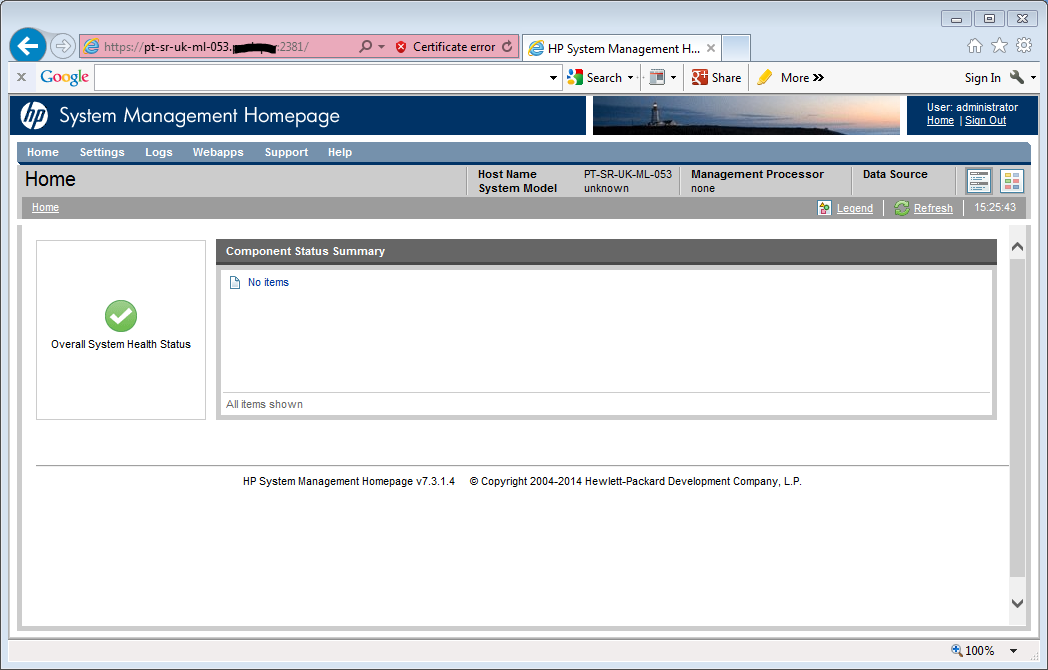
- psp패키지 삭제절차
$> yum erase hp* - HP 툴이름별 역활
툴 이름 역 활 hp-healt hhp시스템상태 및 명렬줄 유틸리티 hponcfg iLO온라인 구성 유틸리티 hp-snmp-agents 시스템 management snmp 에이전트 hpsmh 시스템 관리 홈페이지 hp-smh-templates 홈페이지 템플릿 cpqacuxe 디스크 구성 유틸리티 hp-ams iLO 내부상태 및 경고 지원
2022년 8월 7일 일요일
Centos에서 HP PSP설치

피드 구독하기:
댓글 (Atom)
-
perplexity에서 생성한 AI이미지 시작하는말 안녕하세요, 고니입니다. OS 계정이 root가 아닌 일반 계정에서 kubectl을 사용할 인증정보가 없기 때문에 사용할 수 없습니다. 이를 해결하기 위한 절차를 기술합니다. 작업절차 인증서 ...
-
Bottle 설치 - 리눅스에서 스타도전기. 에 적어두었던 Bottle 사용하다보니 아쉬운 이슈? 버그가 하나 있어요. 바로 한글 입력 문제인데 카카오톡에서 안녕하세요라고 입력하고 싶었는데 이렇게.... ㅠㅠ 해결할 수 있는 방법은 bott...
-
발생현상 pod 구동될때 Imageinspecterror 메시지를 출력하면서 구동되지 않는 문제 $> kubectl describe pod {{ pod명 }} ... Events ... Imageinspecterror docker data ...


댓글 없음:
댓글 쓰기